


Webex Intune
3.917.00 Reviews
App Specs
- Version
- 46.8.0.116
- Updated On
- License
- Free
- Downloads
- 100,000+
- Developer
- Cisco Systems, Inc.
- Categories
- Business
- Platform
- Android
Screenshots



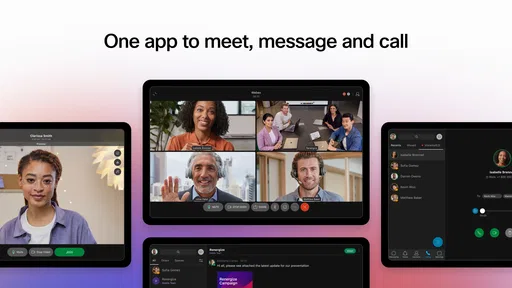
 Analysis by AppCompare
Webex Intune is a business app from Cisco Systems, Inc. aimed at people who need a work-focused collaboration experience on a managed mobile device. After spending time with it, my main impression is that it makes the most sense inside an organization that already uses Cisco’s Webex environment and Microsoft Intune for device management. It is free to download, rated for Everyone, and built for practical workplace communication rather than casual social use.
My clear recommendation is therefore conditional: if your employer has prepared Webex Intune as part of its mobile-work setup, it can be a sensible and secure way to keep team communication available away from a desk. If you are simply looking for a general-purpose chat or meeting app for personal use, this is probably not the version I would choose first. Its value comes from the managed business context around it, not from being a universal replacement for every collaboration tool.
Where Webex Intune earns its place in a business workflow
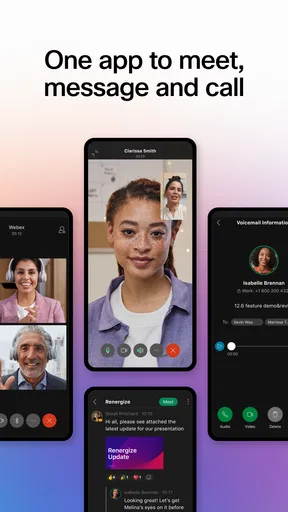
The most important thing to understand is that Webex Intune is not just a normal consumer download with a business label attached. The short store description identifies it as “Webex Intune,” while the broader product positioning presents it as a secure, all-in-one team collaboration app. In practice, that points to a mobile experience intended to work alongside an organization’s security and administration rules.
That distinction matters when you are using a company phone, a personally owned device enrolled for work, or a handset that has separate work and personal areas. A regular collaboration app may be easy to install, but it may not fit an employer’s mobile-management requirements. This version is more relevant when the organization wants staff to communicate through a controlled workplace setup without treating business conversations like ordinary personal messaging.
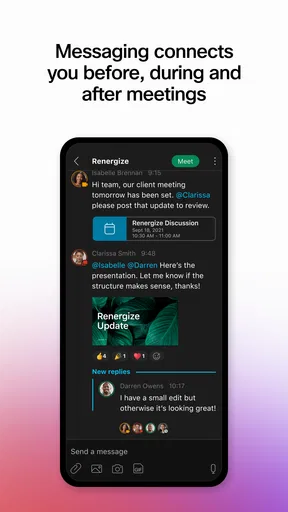
I found the strongest argument for it in the way it supports continuity. A workday rarely stays at a desk. Someone may need to check a team conversation before a meeting, respond to a colleague while travelling between offices, or join an urgent discussion when a laptop is unavailable. A mobile collaboration client can prevent those small interruptions from becoming larger delays.
That does not mean the phone should become the main place for every business task. Long messages, detailed document discussions, and complicated meeting preparation are usually easier on a larger screen. Webex Intune is more convincing as a companion to a wider workplace system: it keeps communication within reach, then lets the user move to a desktop when the task demands more space and concentration.
The security context is more important than the download itself
The presence of Intune in the name is a useful clue for prospective users. In a company environment, the app may be selected because the organization wants its collaboration tools to fit an existing mobile-management approach. That can make the setup more reassuring for an employer, but it also means the experience is not entirely yours to configure like a personal app.
Worth Reading Before You Choose

EA SPORTS FC Mobile 26 Is a Bigger Football Game, but It Takes Time

Flipboard Shows What News Apps Must Do Beyond the Feed

Switching to Android Auto Means Rethinking Your Driving Routine

Google Calendar Makes a Crowded Week Easier to Manage

Ludo King Makes the Most of the Minutes Between Plans

Baby Panda World Brings Quick Play to Modern Phones, but Its Game Library Feels Busy
For an employee, this usually changes the first question from “Is this app popular?” to “Has my organization configured it for me?” A workplace administrator may determine how access is established and which account you should use. If you install it without knowing your company’s process, you could end up staring at a sign-in screen without understanding whether you need corporate credentials, an invitation, or a managed device profile.
My practical advice is to treat installation as part of your employer’s onboarding instructions. Before troubleshooting the app, check whether your workplace has supplied a specific sign-in method or deployment step. This is one of the less obvious realities of business software: a technically capable app can still feel broken when it is installed outside the workflow it was designed to support.
That managed nature is both a strength and a limitation. It can help an organization keep work communication aligned with its policies, but it can also reduce the freedom an individual user expects from a personal messaging app. If you prefer to choose your own account structure, notification behavior, and collaboration tools, this may feel more restrictive than familiar consumer alternatives.
A realistic day-to-day scenario
Imagine a project coordinator who starts the morning at home, travels to a client site, and spends the afternoon away from a computer. A colleague sends a question about a meeting change while the coordinator is in transit. With a suitable mobile Webex setup, the coordinator can review the conversation, answer the immediate question, and keep the team informed rather than waiting until returning to a desk.
Later, the coordinator may need to join a scheduled discussion from the phone. That is where expectations should stay realistic. A mobile device is useful for joining and following a conversation, but it is less comfortable for comparing several documents, taking detailed notes, or managing a complicated agenda at the same time. The app helps preserve access; it does not remove the practical limits of a small screen.
This scenario also reveals a useful workflow tip: use mobile access for decisions and time-sensitive replies, but reserve deep project organization for the desktop experience when possible. That division reduces the temptation to make rushed decisions from a cramped interface and keeps the phone focused on responsiveness.
What I liked about the overall approach
I like that the app is aimed at a real workplace problem rather than pretending every collaboration need is identical. Business users often need a balance between accessibility and control. A mobile client connected to an organization’s managed environment can be more appropriate than asking employees to use whichever messaging application they happen to prefer.
The all-in-one idea is also useful when it genuinely reduces switching. Team communication becomes harder when conversations are scattered across unrelated services, especially for people who work across locations or time zones. Keeping work interactions inside a recognized collaboration platform can make it easier to know where a message belongs and which account should be used.
Another advantage is familiarity for organizations already invested in Cisco’s communication tools. Employees do not necessarily want a completely separate mobile system for every situation. A mobile extension of an established workplace environment can feel more natural than learning an unrelated app solely for phone access.
Still, I would not judge the product only by the phrase “all-in-one.” That promise is useful only if the organization has actually adopted the surrounding Webex workflow. An individual user cannot create the full value alone. The app’s usefulness depends heavily on colleagues, administrators, and existing business processes.
The friction I would want users to expect
The biggest weakness is the dependency on organizational setup. A personal app can often be downloaded, opened, and understood without anyone else’s involvement. Webex Intune is different. If your company has not explained how it should be used, the app may feel unnecessarily complicated before you even reach the collaboration features.
This is not necessarily a flaw in the underlying idea, but it is a real usability issue for employees. The person holding the phone may not know whether a failed sign-in is caused by the password, the account type, the device’s management status, or an administrator setting. That uncertainty can make a simple task feel like an IT ticket.
Notifications are another area where I would be careful. Work communication on a phone can be helpful, but it can also blur the boundary between working hours and personal time. A sensible setup is to decide which conversations deserve immediate alerts and which can wait. If your organization’s rules or the app’s managed configuration limit those choices, you may need to rely more on the phone’s broader notification controls.
There is also a concentration cost. An app that keeps every work conversation close at hand can encourage constant checking. I would use it for availability and urgent coordination, not as a reason to monitor every message throughout the evening. The more successful the app is at keeping work accessible, the more deliberately the user needs to protect personal time.
Finally, mobile collaboration is inherently less comfortable for some tasks. Typing a short response is easy enough, but writing a careful project update, reviewing a long thread, or switching between multiple work references can become tiring. Users who expect a phone app to provide the same efficiency as a desktop workspace may come away disappointed.
How it compares with ordinary collaboration choices
Compared with a general chat app, Webex Intune is the more logical option when the employer has standardized on Cisco’s business environment and wants mobile use to fit its management practices. A consumer messenger may feel faster to set up, but it may not belong in a formal work process or satisfy the organization’s expectations for controlled access.
Compared with a standalone meeting app, Webex Intune is more appealing when your work involves ongoing team conversations rather than isolated calls. A meeting-only tool can be excellent for scheduled sessions, but it may not be the right place for the informal questions, follow-ups, and day-to-day coordination that surround those sessions.
Compared with a project-management platform, it serves a different purpose. A task system is usually better for assigning ownership, tracking status, and preserving structured project history. Webex Intune is more suitable for the human conversation around that work: clarifying an issue, checking availability, or making a quick decision. I would not use it as a substitute for a carefully maintained task board.
That comparison leads to a practical trade-off. The app can reduce fragmentation when your organization already uses Webex, but it will not magically unify a workplace that has adopted several competing systems. If your team communicates in one service, stores files in another, tracks tasks in a third, and holds meetings in a fourth, this app may improve one part of the routine without solving the larger organizational problem.
Who will get the most from it
Webex Intune is a strong fit for employees whose company has explicitly selected it for mobile collaboration. It is especially relevant to people who move between offices, work from client locations, travel for business, or need to remain reachable when a computer is not convenient. It can also suit managers and coordinators who need quick awareness of team conversations without carrying a laptop everywhere.
It is less compelling for someone who works alone, has no Webex-based team, or simply wants a private messaging application. In those cases, the managed business orientation may add friction without providing a meaningful benefit. I would also hesitate to recommend it to a small informal group that only needs occasional chat and has no reason to operate within an enterprise mobile-management structure.
Before installing, I would ask myself three practical questions. Does my organization use Webex for actual work conversations? Has the IT team told me to use this Intune-specific version? And do I need reliable mobile access often enough to justify another work app on my phone? If the answer to all three is yes, the download makes sense. If the answer is no to the second question, I would first confirm the correct app and setup process rather than guessing.
For families or younger users, the Everyone content rating is reassuring in the narrow sense that the app is not presented as age-restricted entertainment. But this remains a workplace tool, not a social app designed around family communication. The rating should not be mistaken for an indication that it is useful outside a business setting.
What the current release tells prospective users
The app was released on July 14, 2020, and the current version is 46.7.0.104. Those details suggest a product with an established place in the mobile collaboration landscape rather than a brand-new experiment. I would still judge it primarily by whether it works with your organization’s current setup, because enterprise apps are often dependent on account configuration and workplace policy as much as on the visible app interface.
It is available at no cost, which removes a direct purchase barrier for individual users. That does not mean every surrounding business service is free or that an organization can use it without administrative planning. For an employee, the more relevant cost may be time spent learning the company’s sign-in and security process, along with the attention required to manage work notifications.
The minimum operating-system requirement is iOS 11, so owners of older devices should check compatibility before planning a rollout. In a personal download, an operating-system requirement is a minor detail. In a company deployment, it can affect whether a whole group of employees can participate from their existing phones, especially when hardware replacement happens on different schedules.
The app has an average rating of 3.9 from around 582 ratings, with 17 written reviews shown in its store presence. I read that as a mixed but reasonably positive signal rather than a reason to install blindly. Ratings can reflect different company configurations, device conditions, and expectations, so your own organization’s setup will probably matter more than the headline score.
Its reach is also visible in the fact that it has passed 100 thousand installs. That gives the app a meaningful user base, but it does not guarantee that it will suit every team. Enterprise collaboration is unusually context-dependent: the same tool can feel smooth in one company and awkward in another because the surrounding policies, account structure, and communication habits are different.
Small habits that make the experience better
My first tip is to separate urgent communication from background awareness. If every work conversation produces an immediate alert, the phone becomes a constant interruption device. Decide which kinds of messages genuinely need a fast response and use quieter periods for everything else. This is especially important when the app is installed on a personal phone.
My second tip is to keep the mobile role narrow and intentional. Use it to confirm a time, answer a short question, review a decision, or join an important conversation. When the task turns into detailed writing or document-heavy analysis, move to a larger screen. This is not a criticism unique to Webex Intune; it is the sensible way to get value from any business collaboration app on a phone.
My third tip is to test the account path before an urgent meeting. Do not wait until you are standing outside a client’s office to discover that your organization expects a different login or managed-device step. A brief test with your normal work account can reveal whether you need help from an administrator while there is still time to get it.
A fourth useful habit is to treat conversations as part of a broader record-keeping process. Quick mobile decisions are convenient, but important project outcomes should remain visible in the team’s accepted documentation or task workflow. That prevents a decision made in a fast chat from becoming difficult to find later.
My verdict for everyday business use
I see Webex Intune as a focused tool with a clear audience, not a universal collaboration recommendation. Its strongest quality is the connection between mobile access and an organization-managed workplace environment. That combination can be genuinely useful for employees who need to stay responsive while moving around, and it is more appropriate than an informal messenger when the company has chosen a controlled Webex workflow.
Its main drawback is the same thing that gives it purpose: dependence on the employer’s setup. People who expect instant personal use may find the onboarding and account context less straightforward than with ordinary chat apps. The phone interface also cannot replace the comfort of a desktop for complex work, and constant access can create unwanted pressure to remain available.
My final recommendation is simple: install Webex Intune when your organization directs you to use it, not merely because you want another chat app. For a Cisco-based business workflow with managed mobile devices, it can be a practical bridge between office communication and work on the move. For personal messaging, small informal groups, or teams that already rely on another platform, I would choose a simpler alternative that matches those needs more directly.
In short, I would recommend it to the right workplace rather than to everyone. Its value is less about flashy extras and more about fitting mobile collaboration into a company’s existing structure. When that structure is already in place, the app can make everyday coordination easier. When it is not, the same managed design becomes unnecessary friction.
Pros
- Strong encryption and enterprise-grade security controls
- Supports managed access through Microsoft Intune policies
- Reliable video and audio quality on stable connections
- Useful whiteboard and screen-sharing collaboration tools
- Works across mobile
- desktop
- and web platforms
Cons
- Requires an organization account for many features
- Some advanced tools depend on Webex subscription plans
- Mobile app can consume significant battery during meetings
- Interface may feel complex for first-time users
- Background activity may increase data usage on mobile networks
FAQs for Webex Intune
What is Webex Intune, and who is it designed for?
Webex Intune is the managed version of the Webex mobile app intended for organizations that use Microsoft Intune to control and secure workplace applications. It provides access to Webex messaging, meetings, calling, and collaboration features while allowing an employer or administrator to apply security policies, manage data, and control account access on supported Android and iOS devices.
Do I need a company account or administrator approval to use Webex Intune?
Yes, Webex Intune is generally intended for business or educational users rather than personal accounts. Your organization normally needs to provide a Webex account, configure the required services, and make the application available through Microsoft Intune or another approved management system. Depending on company policy, you may also need to enroll your device and complete additional authentication before using the app.
What features are available in Webex Intune?
The available features depend on your organization’s Webex subscription and administrator settings, but users can typically send messages, participate in spaces and teams, join or schedule meetings, make or receive business calls, share files, and collaborate with colleagues. Some features may be restricted, redesigned, or unavailable when security policies are enabled, so the experience can differ from the standard consumer installation.
How does Webex Intune protect company information on a mobile device?
Webex Intune can work with Microsoft Intune app protection and device-management policies to help keep business information separate from personal data. Administrators may require a passcode, restrict copying and sharing, control screenshots or file transfers, enforce encryption, and remotely remove organizational data. The exact protections vary according to your employer’s configuration and your device platform.
What should I check before downloading Webex Intune?
Before downloading, confirm that your organization specifically instructs you to install the Intune-managed version and check whether your Android or iPhone meets the required operating-system version. You should also verify that you have valid Webex credentials, Microsoft Authenticator or other required sign-in tools, and permission to enroll the device. Installing the app alone may not provide access without administrator configuration.


